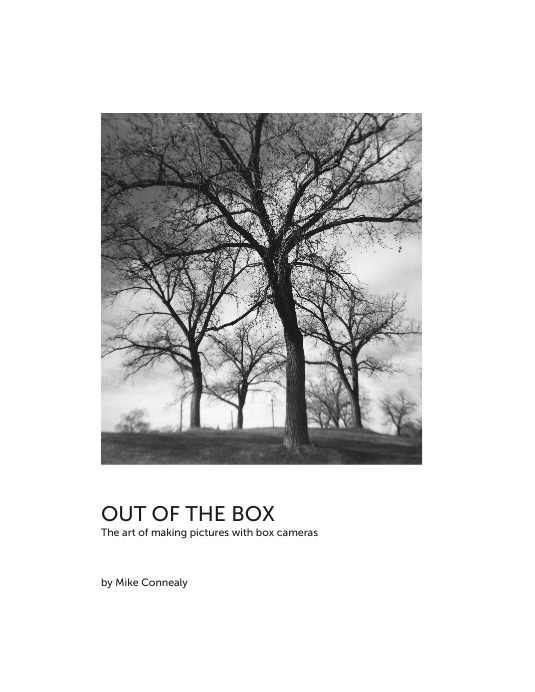
I have completed the process of creating a photo book using Blurb's BookWright application. I uploaded my efforts to the Blurb site and received the proof copy about two weeks later. It all looked pretty good, but I decided to adjust the contrast in a few of the pictures and corrected a couple errors in the text. I resubmitted the material and ordered three copies for my own use, along with a pdf which I will redistribute myself. The book is now listed in the Blurb bookstore where it can be previewed and purchased.
I have no complaints about the quality of the results I got from Blurb. The images look as good to me as what I could do myself on a good quality inkjet. The layout and design seems exactly as I specified. Most importantly, as a newcomer to self-publishing, I think the Blurb experience provided a very good basic introduction to the process of book design.
Where Blurb comes up short in my opinion is in regard to economic feasibility. Going much beyond the 32 pages of the book I produced results in a product that will be priced beyond what I think most people are prepared to pay for a photo book. I think a book of the size I made could be used effectively as an exhibit catalog, and that is actually something I had in mind in its creation. For something more substantial I think I would look to other possibilities.
I have put together a page on my book on my blog with a link to the Blurb bookstore. I also made the pdf ebook available on the page which contains all the text and illustrations of the hardcopy at a cost of five dollars. However, for the remainder of the month of January I will email a copy to anyone interested at no charge. I would suggest that people wanting the pdf contact me directly by email rather than posting a message in the blog comments. My email address is mike dot connealy at gmail dot com.
The pdf file of the book is viewable on any device, though big screens are going to be a better choice. Web browsers can handle pdf display, but a dedicated viewer like Adobe Acrobat Reader will do a better job of displaying two pages simultaneously as the book was designed to be viewed; there is one double-page photo spread where that is particularly desirable.
Showing posts with label Blurb. Show all posts
Tuesday, January 19, 2016
Friday, January 08, 2016
Phase One
I uploaded a proof copy of my publication to Blurb yesterday. The 30-page softcover in magazine format was put together with Blurb's BookWright application. For free software, I thought BookWright was really pretty nice in that it lets you combine text and pictures easily and provides what looks to be a good approximation of what the published document will look like. There were a few small glitches and bugs in the process, but it is clear from reading on line chatter about the program that it has undergone a very rapid period of development in which a large number of the complaints of users have been responded to. My guess is that my own comments here are going to be dated very quickly.
The documentation for some features is a little sketchy, but most of that is taken care of by a bit of experience in using the program. For instance, I had a little trouble discerning at first how to save my images in PhotoShop in a form that would be acceptable for printing. Getting the images and text boxes lined up properly was a little challenging as there is no snap-to function and the grid display is not very helpful. While there are a large number of fonts available, there is not a very good way of establishing a user-chosen default, and I found I had to keep checking to make sure the program was using the choice I preferred. None of these issues was a deal breaker, however, and I think one is likely to face similar problems with about any software package of this type.
The question that remains unanswered for me is whether or not the Blurb final product is going to meet my expectations in regard to quality and cost. I thought I might get some idea about those issues by looking at examples in the on line store where users' publications are shown. It turns out however that somewhere in the neighborhood of 99% of the Blurb self-publishers don't seem to have a clue about making books. Most of the photo book offerings lack any clear message and often seem to be rather randomly assembled collections of pictures, usually with no textual context. Prices for hardcopy books very often exceed $100, which is way, way beyond what I would be willing to pay, even for something very well produced and by a known artist.
So, I am relying at this point mostly on my own experience and perceptions for evaluating the Blurb possibilities. I decided to keep costs in check by selecting the better quality magazine format and limiting the page count. I was pleased to see that I could produce a publication that presented some coherent ideas at a base cost of under ten bucks. However, when I placed the order for my proof copy I was shocked to see that the shipping charge for that single issue was over six dollars. That, for me, makes the total cost just barely acceptable. As it turns out, you can get up to five issues of the publication shipped for the same amount, but I'm not sure that really offers me anything useful.
My impression at this point is that the most practical outcome of my Blurb efforts will be some kind of ebook, probably in pdf format. That could be made available on line, and the production cost is neglibible. I will probably put together a package of options including hardcover offerings, but my expectations at this point fall quite a bit short of the self-publishing hype that presently saturates the web.
The documentation for some features is a little sketchy, but most of that is taken care of by a bit of experience in using the program. For instance, I had a little trouble discerning at first how to save my images in PhotoShop in a form that would be acceptable for printing. Getting the images and text boxes lined up properly was a little challenging as there is no snap-to function and the grid display is not very helpful. While there are a large number of fonts available, there is not a very good way of establishing a user-chosen default, and I found I had to keep checking to make sure the program was using the choice I preferred. None of these issues was a deal breaker, however, and I think one is likely to face similar problems with about any software package of this type.
The question that remains unanswered for me is whether or not the Blurb final product is going to meet my expectations in regard to quality and cost. I thought I might get some idea about those issues by looking at examples in the on line store where users' publications are shown. It turns out however that somewhere in the neighborhood of 99% of the Blurb self-publishers don't seem to have a clue about making books. Most of the photo book offerings lack any clear message and often seem to be rather randomly assembled collections of pictures, usually with no textual context. Prices for hardcopy books very often exceed $100, which is way, way beyond what I would be willing to pay, even for something very well produced and by a known artist.
So, I am relying at this point mostly on my own experience and perceptions for evaluating the Blurb possibilities. I decided to keep costs in check by selecting the better quality magazine format and limiting the page count. I was pleased to see that I could produce a publication that presented some coherent ideas at a base cost of under ten bucks. However, when I placed the order for my proof copy I was shocked to see that the shipping charge for that single issue was over six dollars. That, for me, makes the total cost just barely acceptable. As it turns out, you can get up to five issues of the publication shipped for the same amount, but I'm not sure that really offers me anything useful.
My impression at this point is that the most practical outcome of my Blurb efforts will be some kind of ebook, probably in pdf format. That could be made available on line, and the production cost is neglibible. I will probably put together a package of options including hardcover offerings, but my expectations at this point fall quite a bit short of the self-publishing hype that presently saturates the web.
Monday, December 21, 2015
progress
So, I went to my local used computer guy and bought a not-new laptop running Windows 7 so that I could run the Blurb book creation software. Not exactly state of the art, but it looks like it will do the job. Also picked up a $25 19-inch monitor today so that I can see what I'm doing.
After years of putting my photos on line on my blog and my web site I see that I have a lot to learn about producing images for print. It is a sobering experience, but not without reward. I've worked through most of the issues with Photoshop at this point. Now, I'm looking at learning some new things about layout and fonts, along with rethinking some ideas about why and how I make my images. It is nice to have a project to work with.
Saturday, November 24, 2012
What did you shoot this weekend?
Here is another good book choice for the photographer on your holiday gift list. This self-published Blurb book is edited by Filmwaster Calbisu and contains many of the best images from regular participants at the Filmwasters forum. Click the image for a full preview of the contents.
The first version of this book was hardcover, and it contained a number of blank pages that drove up the price to over $60. There is now a softcover version at $35, which makes it very competitive, particularly in view of the outstanding images. As of this writing, there are a few more changes to the format that may be made, but it is promised that they will be finalized within five days.
Labels:
Blurb,
books,
Filmwasters,
What did you shoot this weekend?
Wednesday, November 21, 2012
The Light Gatherer
I've been following the photographic artistry of Norman Montifar for quite a while at Flickr and on his blog. Now he has produced his first book, self published through Blurb and entitled The Light Gatherer.
Most of Norman's pictures are made in and around New York City. Quite a few might be classed as street photography, but his scope is really wider than that. As he says in the book's introduction: "...It's an exercise in observation, studies of the nuances of natural light and capturing the unexpected when subjects turn up in totally unpredictably interesting ways."
All of Norman's work shows a great eye for composition, whether his subject is a pattern of shadows on a city street, or people playing, working or just being themselves in their neighborhoods. Throughout this urban tapestry, Norman always seems to find and portray a serenity that many other photographers of the City have missed. There is also a good deal of gentle humor to be found in his pictures of New Yorkers, but never of a kind that his subjects would find objectionable.
I am also particularly impressed with the level of craftsmanship which Norman brings to his work. Meticulous attention to the details of the craft is present in every picture in the book; it is a work that can instruct and inspire anyone regardless of experience and skill levels in photography.
Norman and I have exchanged a couple old cameras in the past, and I know from correspondence that the majority of the work in this book was done on film. Pro that he is, though, if digital suits his purpose that is what he will use, but you will see none of the over-saturated digital gimmickry here that so clutters today's visual experience for all of us. What you will find is classical technique attuned to the subtle rhythms of daily life in the City.
Labels:
Blurb,
Malikmata,
Norman Montifar,
Street,
The Light Gatherer
Subscribe to:
Posts (Atom)